
Colorado State University Facilities Management
Information Technology Procurement Policy
Date Created: 06/16/2022
Last Updated: 10/2/2026
Purpose
The purpose of this policy is to ensure that the procurement of information technology hardware, software and services follow established Colorado State University policies and guidelines, that due diligence is performed to ensure compatibility with existing systems and policies, that appropriate plans are associated with technology acquisition and that the approval of the CSU Facilities Management IT Manager and Finance organization is obtained prior to issuance of a purchase order, disbursement voucher or purchase of items on a CSU issued PCARD. This policy applies to all technology resources and related services owned, used, or operated by Facilities Management supported by Facilities Management Information Technology, regardless of the source of funding, location or intended purpose. These resources include but are not limited to: Computers and Servers of any form factor; Software and information systems; Technology services, consulting, and maintenance contracts; Peripheral equipment (e.g. printers, scanners, etc.); Network devices; audio-visual and surveillance devices.
The following policies have been developed in conjunction with CSU procurement policies, Facilities Management Finance division, and CSU Division of IT recommendations to properly facilitate the acquisition, deployment, support, repair, and replacement of Facilities Management Technology solutions.
Summary
The policies below have been developed to:
- Standardize hardware models to improve service and reduce IT support costs for CSU Facilities Management.
- Manage hardware lifecycles including procurement, imaging, deployment, maintenance, refresh and disposal of Facilities Management systems.
- Ensure that purchased technology follows CSU Procurement, CSU Division of IT, Facilities Management Information Technology and Facilities Management Finance policies.
- Manage software lifecycles including installation, patching, upgrades, renewals, and support/maintenance contract renewals on Facilities Management supported systems.
- Ensure that purchased software and hardware meet Colorado State University and Facilities Management security standards.
To ensure compatibility with the CSU network and technology environment, Facilities Management Information Technology is required to review all proposed technology hardware and software purchases.
If your purchase is non-standard, you may be required to complete an IT Procurement Review (ITPR) or Exception Waiver before purchase. The purpose of the review is to document that the product meets usability, accessibility, and security standards or has a properly approved and documented exception to these standards.
Any purchase completed outside of these policies, without the knowledge and approval of Facilities Management Information Technology will not be covered under Facilities Management Information Technology support structure, including equipment refresh, software renewals and/or support/maintenance contract renewals. Purchases of any IT related hardware or software outside of these policies is subject to review once discovered and may be removed without notice if it is determined the item is not compatible with CSU systems or has exposed CSU to security risks.
Scope
This policy applies to all CSU Facilities Management purchased information technology resources including but not limited to desktops, laptops, servers, printers, scanners/plotters, mobile devices, network devices, peripherals, software, software as a service (SaaS), and contracted IT services or training.
New Hardware Purchases
Unless otherwise specified, user hardware requests will be fulfilled using the Standard Hardware Options below. If the requirement is for different hardware outside of the options listed below, please contact Facilities Management IT for pricing and availability. FM Information Technology can facilitate the purchase of hardware other than our Standard Hardware Options, but an Exception Waiver may be required to complete purchase.
FM Information Technology will cover costs for all new standard hardware requests (new employees), replacements and refresh for out-of-date hardware. Duplicate devices for remote or off-site work must have supervisor approval in advance and be attached to the request ticket.
FM Information Technology will pay the full purchase cost for any servers or any network device that could be required to keep or upgrade our operational services.
All hardware purchases require approval from the IT Manager prior to being submitted to Finance for procurement.
Hardware Replacement and Refresh
For the purposes of this document, hardware replacement refers to replacing a broken, lost, end-of-life or otherwise unusable piece of hardware. Hardware refresh refers to updating hardware equipment that is still functioning but is no longer in warranty and has reached refresh age.
All hardware purchases require approval from the IT Manager prior to being submitted to Finance for PO generation.
Replacement
If the item in question is still within warranty, replacement of the device will be handled via standard warranty repair/replacement through the device vendor.
If the item in question is no longer in warranty period, replacement of the device will be considered a refresh. FM Information Technology will cover all replacement costs unless the reason for replacement has been determined to be due to employee negligence or purposeful action, in which case full cost of the replacement will be charged to the employee’s FM unit.
Refresh
FM Information Technology will refresh hardware devices on a regular schedule as budgets allow to ensure functionality and compatibility with the CSU network.
- Desktop & Laptops – 5 years
- Servers & Network Equipment – 5 to 7 years
- Mobile Devices – 5 years
- Peripherals (Monitors, Mice, Keyboards, Headsets, etc) – 3 years
All hardware refresh costs will be covered by FM Information Technology unless refresh is requested out of cycle for hardware that is still functional and not creating productivity issues for the employee.
Hardware Options
The options below may change at any time due to availability, price, and vendor model retirement. It is recommended that supervisors and managers download a new copy of this document prior to requesting any purchases.
Computers
Standard Option | |
Image reference | Description |
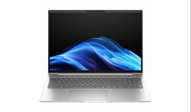
| HP EliteBook 8 G1i 16-inch Notebook PC – Intel Core Ultra 5 228V – 32GB DDR5 RAM – 512GB SSD Standard base model Weight: 3.84 lbs CDW #: 8336401 Price March 2026: $1,723.71
|
Intermediate Option (CAD/Advanced App Users) | |
Image reference | Description |
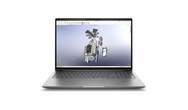
| HP ZBook X G1i 16” Mobile Workstation – Core Ultra 9 285H – 32GB RAM – 1TB SSD – NVIDIA RTX PRO 2000 BLACKWELL
Weight: 4.50 lbs CDW PART: 8477836 Price March 2026: $3,810.51
|
Advanced Option | |
Image reference | Description |
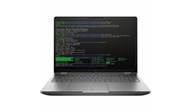
| HP ZBook Fury G1i 16” Mobile Workstation – Core Ultra 7 255HX – 32GB RAM – 1TB SSD – NVIDIA RTX PRO 4000 BLACKWELL High-end dedicated GPU and CPU Weight: 5.36 lbs CDW # 8483964 Price March 2026: $4,434.21 |
Advanced Option 2-in-1 Touchscreen Laptop | |
Image reference | Description |
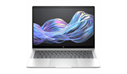
| HP Elite X Flip – Intel Core Ultra 5 226V – 16GB DDR5 RAM – 512GB SSD Weight: 2.60 lbs CDW # 8227786 Price March 2026: $1,716.14
|
Standard Option - Desktop | |
Image reference | Description |
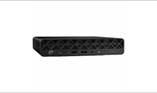
| HP ProDesk 4 G1i Desktop Mini – Intel Core Ultra 5 235T – 16GB DDR5 – 512GB SSD
CDW # 9020921 Price February 2026: $1,007.62
|
Mobile Devices
Tablet Option – iPad 10th generation | |
Image reference | Description |
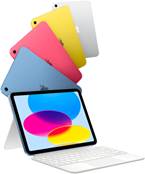
| 10.9-inch Liquid Retina display 64GB and 256GB Capacities Touch ID for secure authentication A14 Bionic Chip 12MP Wide camera with 4K HD video support 12MP Ultra Wide front camera Compatible with Apple Pencil (USB-C) Compatible with Apple Magic Keyboard Folio and Bluetooth keyboards USB-C connector
RamTech cost: starting at $329 + accessories
|
Tablet Option – iPad Mini 6th Gen | |
Image reference | Description |
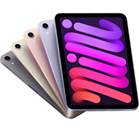
| 8.3-inch Liquid Retina Display 64 and 256GB Capacities Touch ID A15 Bionic Chip 12MP Wide camera with 4K HD video support 12MP Ultra Wide front camera Compatible with Apple Pencil (USB-C) Compatible with Bluetooth keyboards USB-C Connector
RamTech Cost: starting at $449 + accessories |
Tablet Option – iPad Air | |
Image reference | Description |
| 128GB, 256GB, 512GB, 1TB Capacities M2 Chip Touch ID 11-inch Liquid Retina Display 12MP Wide Camera with 4K video support 12MP Ultra Wide front camera USB-C Connector Supports Magic Keyboard and Bluetooth Keyboards Supports Apple Pencil (USB-C) and Apple Pencil Pro
RamTech Cost starting at $549 + accessories |

Tablet Option – iPad Pro | |
Image reference | Description |
| 256GB, 512GB, 1TB, 2TB Capacities M4 Chip Face ID 13-inch Ultra Retina XDR Display 12MP Wide Camera with 4K video support 12MP Ultra Wide front camera USB-C Connector Supports Magic Keyboard for iPad Pro (M4) Supports Apple Pencil (USB-C) and Apple Pencil Pro
RamTech Cost starting at $899 + accessories |

Phones
Standard Option – iPhone 17e | |
Image Reference | Description |
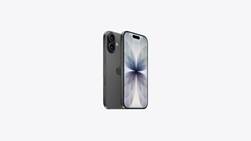
| Capacity - 256GB Display
USB-C Connector IP68 Water Resistant
Cost: $0 + Case and/or accessories
|
Additional Phone Models
Below are additional iPhone models available for purchase starting at $69.99. All the models below will be fully charged to the requesting department.
Model | Price |
iPhone 17e 512GB | $69.99 |
iPhone 17 256GB | $99.99 |
iPhone 17 512GB | $299.99 |
iPhone 17 Pro 256GB | $369.99 |
iPhone 17 Pro 512GB | $569.99 |
iPhone 17 Pro 1TB | $769.99 |
iPhone 17 Pro Max 256GB | $469.99 |
iPhone 17 Pro Max 512GB | $669.99 |
iPhone 17 Pro Max 1TB | $869.99 |
iPhone 17 Pro Max 2TB | $1,269.99 |
iPhone Air 256GB | $269.99 |
iPhone Air 512GB | $469.99 |
iPhone Air 1TB | $669.99 |
For more information about cost and availability please contact FM Information Technology. Visit the Apple Website for more information on the additional models listed above.
Monitors
Standard options for monitors are listed below. Advanced options with higher procurement costs will require supervisor justification and approval.
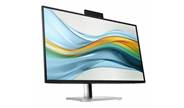
27-inch Display with USB-C Docking and Built-in Camera | |
Image reference | Description |
| HP 527pm 27-inch QHD Monitor with USB-C docking and built-in webcam
CDW Part: 8107150 Price February 2026: $445.50 |
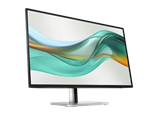
27-inch Monitor With Built-in USB-C Docking | |
Image reference | Description |
| HP 527pu 27-inch WQHD LED Monitor with USB-C docking
2560x1440 resolution USB-C, DisplayPort, and HDMI Inputs Power delivery, Ethernet, USB ports over USB-C Daisy chain DisplayPort displays
CDW#: 8107121 Price February 2026: $377.55 |
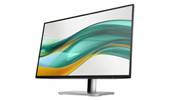
Standard Option – Basic 24” Monitor | |
Image reference | Description |
| HP 524pf 24-inch 1080p LED Monitor
CDW Part: 8055595 Price October 2026: $177.56 |
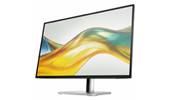
Standard Option – Basic 27” Monitor | |
Image reference | Description |
| HP 527pq 27-inch WQHD LED Monitor
QHD 2560 x 1440 Resolution 27-inch widescreen LED display Tilt, height, swivel stand
CDW#: 8055613 Price February 2026: $320.04 |
Peripherals – Keyboard, Mouse & Headset
Standard options for peripherals are provided below. Advanced options with higher procurement costs or to meet ergonomic needs will require supervisor justification and approval.
Standard Option - Keyboard and Mouse Combo | |
Image reference | Description |
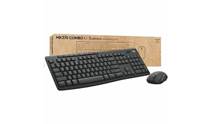
| Logitech Wireless Combo MK370 – keyboard and mouse set
CDW Part: 7487148
Cost October 2026: $32.70 |
Standard Option - Headset | |
Image reference | Description |
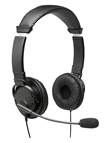
| Kensington USB Hi-Fi Headphones with Mic
CDW Part: 5151290
Cost June 2024: $21.26 |
Advanced Option - Headset | |
Image reference | Description |
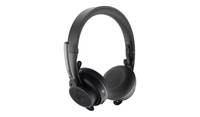
| Logitech Zone Wireless Bluetooth Headset for Microsoft Teams
Wireless via Bluetooth Active Noise Cancellation On-ear style Certified for Microsoft Teams
CDW#: 6083460
Cost June 2024: $133.44 |
Speakers
For users with non-laptop computers (desktops, minis), one (1) set of Standard Option speakers below will be provided on request. Advanced options with higher procurement costs require supervisor justification and approval.
Standard Option - Speakers | |
Image reference | Description |
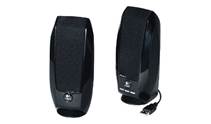
| Logitech S150 USB PC Speakers
CDW PART: 1632115 Cost June 2024: $14.12 |
Advanced Option - Speakers | |
Image reference | Description |
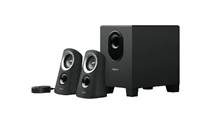
| Logitech Z313 2.1-Channel Speaker System
CDW PART: 1836253 Cost June 2024: $47.09 |
Laptop Carry Case
On request, one (1) laptop carry case will be supplied to laptop users with initial setup. Our standard option is provided below. Advanced options with higher procurement costs will require supervisor justification and approval.
Standard Option – Laptop Carry Case | |
Image reference | Description |
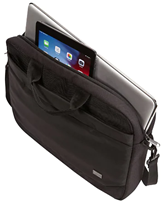
| Case Logic Advantage Attache Case for 15.6" Notebook – Black
The Case Logic Advantage Attache Case features a slim, compact design with padded storage for a laptop up to 15.6 inches. It has a dedicated slip pocket for a 10.1-inch tablet. This black case has a spacious front pocket with an organization panel for pens and small electronics, plus plenty of room for bulky charging cords. Its front pocket with the hidden zipper garage will keep your phone secure and accessible. The designated file pocket keeps documents separate from electronics.
CDW Part: 5487450
Cost June 2024: $26.16 |
Hardware Authentication Devices
The standard method for CSU and Facilities Management employees to complete multi-factor authentication requests is through the DUO Authentication application. DUO is installed by default on all Facilities Management mobile devices.
If an employee does not have a work issued or personal phone on which to install DUO, FM Information Technology will provide one (1) hardware authentication device (Yubikey). FM Information Technology will replace any hardware key that is lost, damaged or otherwise not functioning properly once per employee. Further replacements of lost or damaged devices beyond a single replacement may be billed to the requestors FM unit account.
Miscellaneous Accessories
For any items required that are not covered in this document, please open a ticket with FM Information Technology to receive pricing and procurement guidance.
Printers
FM Information Technology recommends network attached laser printers over personal printers as small inkjet printers may violate CSU’s Live Green Initiative. Printer supplies for network printers are monitored and provided by FM Information Technology, including stocking supplies for common models.
Inkjet printers are not recommended due to increased cost per page printing, the cost and life of inkjet print cartridges, and increased support/hardware issues such as the print not drying or printer head issues.
Please contact FM Information Technology with printer requirements, justification, and supervisor approval. All Facilities Management printers will be leased and maintained under the FM Information Technology budget. Any printers procured outside of this policy will not be supported or maintained by FM Information Technology, including any home printers.
Hardware Disposal
FM Information Technology will recycle all hardware that is no longer in use and ensure that all data and information is destroyed prior to recycling. Once all data is securely removed from old hardware, FM Information Technology will facilitate recycling through the CSU Surplus Department.
Software Procurement
All software installed on a Facilities Management provided computer must be approved by and ordered through FM Information Technology. This is to ensure that all software is compliant with University and Facilities Management policies and any relevant support/maintenance renewals are completed in a timely manner. Any software that is ordered or installed outside of this policy will not be supported, maintained, or renewed in any way by FM Information Technology. If the use of unauthorized software results in computer or network stability issues that software may be removed and blocked without notice.
All computers issued to new employees will have the following software installed by default:
- Microsoft Office
- Microsoft Teams
- Global Protect VPN
- Acrobat Reader
- Browsers - Google Chrome, Mozilla Firefox & Microsoft Edge
If employee job duties require additional software to be installed (Bluebeam, AutoDesk, Adobe Creative Suite, etc) please specify which packages should be installed during employee onboarding or open a ticket with FM Information Technology to request additional software to be installed for existing employees.
Depending on cost, new software procurement for a FM unit may be required to be paid from the FM units budget until the following fiscal year when the software cost can be built into the FM Information Technology budget.
All software purchases require approval from the IT Manager prior to being submitted to Finance for procurement.
Software Renewal
All software or web-based applications purchased through FM Information Technology will be tracked and renewed until the software is no longer required. Please note that it is the responsibility of each FM section to notify FM Information Technology of changes to the number of licenses required by their section. Any software purchased outside of the policies in this document will not be tracked or renewed by FM Information Technology and may be removed from CSU issued devices without notice.
All software renewals require approval from the IT Manager prior to being submitted to Finance for procurement.
Software Support/Maintenance
During the software procurement process, FM Information Technology will also purchase support and/or maintenance contracts available to ensure proper support and troubleshooting resources. All support and/or maintenance contracts for software with a presence on the Facilities Management network will be purchased and renewed by FM Information Technology.
All software support and maintenance contracts require approval from the IT Manager prior to being submitted to Finance for procurement.
Equipment and Supplies for Teleworking
Under the current CSU telework policy, CSU will not reimburse employees for the cost of off-site related expenses such as telecommunications equipment, internet services, furniture, printers, insurance, utilities, or other costs incurred by the employee. Employees must have and maintain the necessary personal and CSU-issued equipment needed to perform job duties. Please note that personal devices should not be used to access the CSU network. Any employment related equipment used for teleworking that is not purchased through FM Information Technology in violation of the policies in this document will not be eligible for support, replacement, refresh, or renewal. Generally, out-of-pocket expenses for supplies will not be reimbursed. Any exceptions must be approved by the employee’s supervisor prior to purchase.
NOTE: It is the recommendation of FM Information Technology that all new users and existing users are setup with laptops that enable teleworking without additional equipment, to reduce duplicate equipment and user support/security issues that arise with using some form of remote desktop to access a desktop computer in a CSU building.
Version | Date | Author | Revision Notes |
6.1 | 10/2/26 | Dobbins | General Policy Updates |
6 | 4/22/26 | Edwards/Dobbins | Updated pricing, standard models |
5 | 8/15/25 | Edwards/Dobbins | Updated pricing, purchase policies |
4.1 | 1/16/25 | Dobbins | Added Hardware Security Keys section |
4.0 | 6/27/24 | Edwards/Dobbins | FY25 Update |
3.0 | 7/31/23 | Shadman-Adolpho/Edwards/Dobbins | FY24 Update |
2.3.1 | 2/6/23 | Barry Shadman-Adolpho | Pricing Update |
2.3 | 2/6/23 | Jacob Edwards | Pricing update Feb ’23, added pen to x360 |
2.2 | 1/12/23 | Barry Shadman-Adolpho | Added speakers |
2.1 | 8/26/22 | Michael Dobbins | Added laptop bag |
2.0 | 6/16/22 | Jacob Edwards, Nestor Flores | FY23 Update |
1.0 | 2/8/22 | Nestor Flores | Policy Creation |